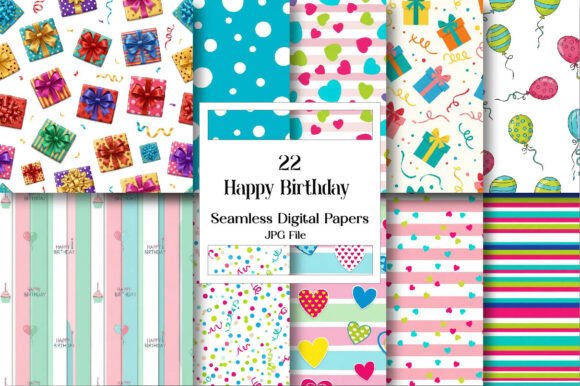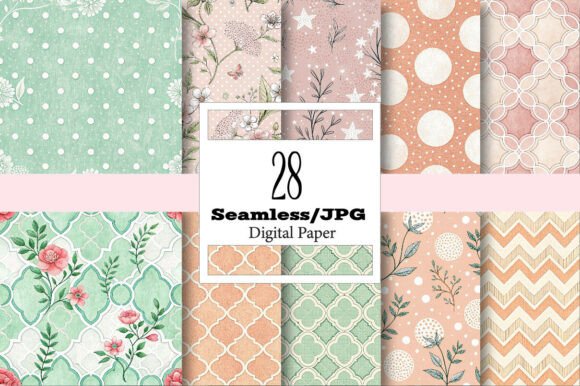
Digital Paper Backgrounds: A Creative Cornerstone for Modern Projects
In the world of digital creation, the term Digital Paper Backgrounds often appears as a simple, almost mundane product listing. Yet, for countless designers, crafters, and entrepreneurs, these versatile files are the invisible foundation upon which entire projects are built. They are high-resolution, 300 DPI digital image files designed to mimic the texture and feel of physical paper, but with infinite reproducibility and adaptability. The true allure isn't just the cute patterns or watercolor effects; it's the profound utility. From sublimation graphics for a personalized tote bag to a seamless background for a website, these digital assets transform a single download into a spectrum of tangible and digital applications.
Understanding the Core Value Beyond the First Glance
A common initial mistake is viewing Digital Paper Backgrounds merely as "pretty pictures." This undervaluation leads to poor selection. The critical feature is seamless repetition. A true seamless Digital Paper Background can be tiled infinitely without visible edges, making it perfect for wrapping a tumbler or covering a large party napkin. A non-seamless file, however, will create a glaring, repetitive grid pattern that ruins the professionalism of your mug design or website graphic. Before downloading any pack, scrutinize sample previews at a zoomed-out view to check for seamless tiling.
Another overlooked detail is the actual intended use versus file format. Receiving a JPG is standard, but JPGs are compressed. For high-quality sublimation on a pillow or printing on fabric, you must ensure the JPG is truly high-resolution (300 DPI) from the source. Using a low-resolution background for a physical print results in a blurry, pixelated final product—a disappointing outcome for a wedding invitation or candle label. Always verify the seller explicitly states the DPI and that dimensions can be resized up, not just down. Resizing a 300 DPI file larger for a poster is possible; resizing a 72 DPI web graphic up to 300 DPI will not magically create quality.
Navigating Licensing and Practical Application Pitfalls
The excitement of an "instant digital download" for DIY projects can sometimes eclipse a careful review of licensing terms. Many creators assume these backgrounds are free for all commercial use. While often true for platforms like Etsy, some licenses may restrict mass production (like for KDP paperback interiors) or require attribution. Using a background with unclear licensing for your small business logo or social media graphics could lead to legal complications. The practical advice is simple: read the product description thoroughly before purchase. A reputable seller will clearly state the license type.
Once you have your perfect Digital Paper Background pack, a frequent technical error is improper color mode handling. Most digital papers are in RGB color mode, ideal for screens and sublimation. However, if you are sending a project to a professional printer for scrapbook decoupage paper or playing cards, they often require CMYK mode for accurate color reproduction. Converting RGB to CMYK can cause noticeable color shifts—your vibrant trendy social media background may print with dulled hues. To avoid this, either find backgrounds specifically offered in CMYK, or work with a printer who accepts RGB files and manages the conversion themselves.
The Misstep of One-Size-Fits-All Thinking
Creators often try to force a single Digital Paper Background into every project type, from a mini junk journal to a tumbler wrap. While versatility is a strength, each application has unique demands. A dense, detailed floral pattern might be stunning on a printable fabric for a tote bag, but when shrunk down for a soap product label, the detail becomes clutter and text becomes unreadable. Similarly, a light, subtle texture works beautifully for a notebook cover or planner, but might offer insufficient contrast as a website graphic. The better approach is to curate your digital library with variety: bold patterns for statement items like mugs, and simpler, scalable textures for multi-use items like cards making and wallpapers.
Storage and organization are another easily neglected aspect. After downloading dozens of packs for crafts and gifts, files become a disorganized digital heap. When you need a specific background for a baby shower invitation, you waste precious time searching. Implement a simple system immediately: create folders by theme (e.g., "Watercolor," "Geometric"), by project type (e.g., "Sublimation," "Printing"), or by color. This small investment in organization dramatically improves your efficiency and creative flow.
Ensuring Technical Compatibility for Specialized Uses
For specialized techniques like sublimation, a specific technical misunderstanding can ruin materials. Sublimation requires the graphic to be mirrored before printing onto transfer paper. Beginners using Digital Paper Backgrounds for tumbler and mug sublimations sometimes forget this mirroring step, resulting in a reversed, incorrect design on the final product. Always perform a test print on plain paper first to check orientation. Furthermore, ensure your background design fits the template of the specific tumbler or mug wrap you're using; an otherwise perfect seamless background might have a key visual element cut off by the wrap's seam.
When using these backgrounds for digital presentations or website graphics, a frequent oversight is file size optimization. A 300 DPI JPG at poster dimensions is enormous and will slow a website to a crawl. You must resize and compress the file for web use while maintaining visual quality. Tools like image editors or online compressors allow you to reduce the file size significantly without degrading the appearance on screen. This step is crucial for user experience and SEO, as slow-loading sites are penalized by search engines.
A Constructive Checklist Before You Download or Apply
To consistently achieve great results with Digital Paper Backgrounds, develop a quick pre-use checklist. This habit prevents the common errors discussed and elevates your work.
- Verify Resolution & Seamlessness: Confirm 300 DPI and check previews for seamless tiling if needed for wraps or large backgrounds.
- Clarify Licensing: Read the license terms for your intended use, especially if it's commercial.
- Match the Design to the Project Scale: Choose simpler patterns for small items like stickers, and more complex designs for larger areas like wall art.
- Prepare for the Output Medium: Know if your final product is digital (RGB) or professional print (CMYK) and plan accordingly.
- Organize Your Assets: File your downloads systematically from day one to save future time.
- Test Technical Processes: For sublimation, always mirror. For web use, always compress. Run a small test before committing full resources.
Embracing Digital Paper Backgrounds with this mindful, prepared approach unlocks their true potential. They become not just a decorative element, but a reliable, high-quality raw material for your creativity. Whether you're a hobbyist making handmade stationery or a marketer designing social media graphics, avoiding these common pitfalls ensures your projects—from personalized pillows to book covers—are executed with efficiency, quality, and satisfaction.